
Why Software Choice Matters in Jig & Fixture Design
Choosing the right software for designing jigs and fixtures plays a critical role in ensuring precision, efficiency, and manufacturability. The right tool impacts accuracy, tolerance stack-upund overall manufacturing readiness, directly influencing the success of the design.
Impact on Accuracy, Tolerance Stack-up, and Manufacturing Readiness
Jig and fixture design is about precision. The software must handle tight tolerances and ensure that the fixture aligns properly for its intended Bearbeitung operations. Good software will minimize tolerance stack-up — the accumulation of small tolerances that can lead to larger deviations. Accurate designs mean fewer errors and faster, more cost-efficient production.
Importance of Simulation for Clamping, Distortion, and Load Validation
Simulation tools integrated into design software are essential for validating the clamping forces, part distortion, and the load paths during Bearbeitung. A fixture design needs to hold the workpiece securely without causing deformation. Software that includes these capabilities can simulate these forces and help ensure that the fixture performs as required before it’s built.
Role of CAD–CAM Integration
CAD and CAM integration is crucial for a smooth transition from design to manufacturing. The software must not only allow for precise design but also prepare the file in a format ready for CNC machining or other manufacturing processes. A seamless link between design and Bearbeitung helps reduce human error, optimizes part placement, and ensures that the fixture works as intended.
What Makes Jig & Fixture Design Software “Good”?
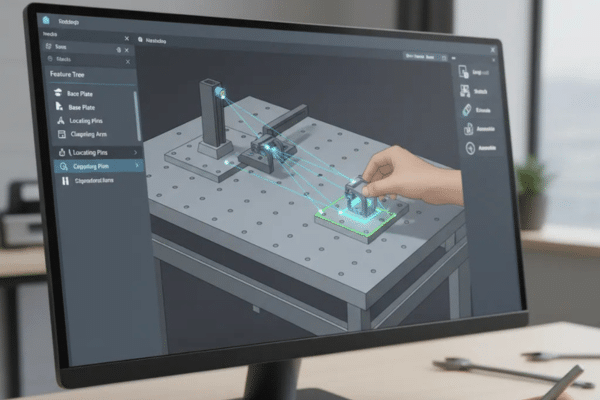
When evaluating software for jig and fixture design, several key features stand out in making the process easier, faster, and more accurate.
Key Criteria
Assembly Handling Capability
Jigs and fixtures typically involve multiple components that must fit and align correctly. A good software tool should offer robust assembly handling, making it easier to manipulate complex designs with multiple parts while maintaining precise alignment and fit.
Parametric Modelling Efficiency
The ability to quickly alter a design with parametric modeling—where dimensions automatically update when changes are made—is key to efficient fixture design. This ensures that you can quickly adapt designs based on updated tolerances, Materialien, or manufacturing requirements.
Standard Library Availability (Locators, Clamps, Tool Bodies)
A comprehensive library of standard components such as Ortungsgeräte, clampsund tool bodies can save considerable time in fixture design. These ready-to-use components make the design process more efficient and reduce the need for custom part creation.
Simulation Capability (Stress, Deformation, Vibration, Thermal)
A strong simulation module is essential for testing the fixture’s performance before it’s manufactured. Software should be able to simulate stress, deformation, vibrationund thermal expansion to predict how the fixture will behave during Bearbeitung.
CAM Integration
Having a CAM module or easy integration with external CAM tools ensures that the fixture design can be easily transformed into manufacturing instructions, reducing the time spent translating designs into Maschine-readable code.
Industry-Specific Tools (BIW, Welding, Machining Fixtures)
Jig and fixture designs vary by industry. Software tools that cater to specific needs—like Body-in-White (BIW) fixtures for automotive manufacturing, Schweißvorrichtungen, oder Bearbeitung fixtures—can provide templates and specialized design modules that meet industry requirements.
SolidWorks for Jig & Fixture Design
Why SolidWorks Is Popular
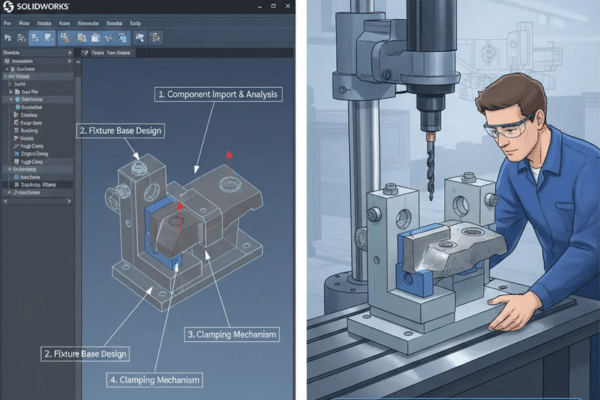
SolidWorks is a widely adopted tool known for its ease of use, especially in job shops und small to medium enterprises (SMEs). It offers fast sketch-to-assembly workflows, a large library of standard parts, and powerful simulation tools.
Best Use-Cases
- Machining fixtures
- Assembly jigs
- Drilling jigs (with bushings)
- Low–medium complexity fixtures
Stärken
- Fast sketch-to-assembly workflow: Easy to create 3D models and assemblies from sketches.
- Mates ideal for fixture alignment: SolidWorks’ mate system ensures precise alignment of fixture components.
- SolidWorks Simulation for FEA: Built-in tools for performing Finite Element Analysis (FEA) help validate designs for stress, load, and deformation.
Limitations
- Not ideal for complex surfaces: SolidWorks is limited when working with highly complex surfaces, making it less suited for certain industries like aerospace.
- Large assemblies slow down: When handling large assemblies, SolidWorks can become sluggish, which may affect productivity in industries requiring intricate fixtures.
CATIA for Jig & Fixture Design
Industry Strength
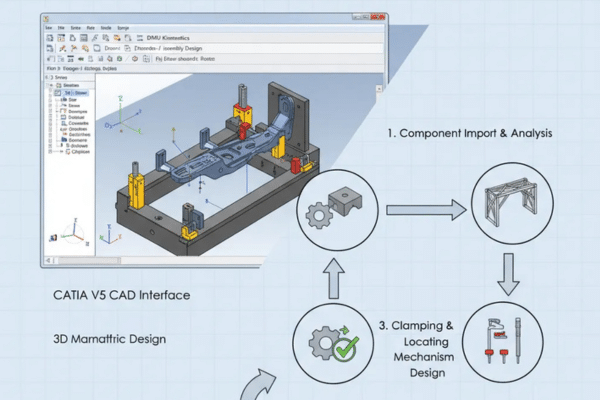
CATIA is a high-end CAD tool heavily used in Automobil und Luft- und Raumfahrt industries for complex surface modeling and large-scale system engineering. It’s often the go-to solution for Body-in-White (BIW) fixture design.
Best Use-Cases
- Welding fixtures
- Checking fixtures
- Body-in-White (BIW) tools
- High-precision aerospace fixtures
Stärken
- Complex surface management: CATIA excels at surface modeling, which is essential for industries like aerospace and automotive where the design of complex geometries is required.
- Assembly-level design control: CATIA’s assembly design capabilities provide strong control over large-scale, complex fixtures, making it ideal for large manufacturing environments.
- Advanced kinematics: CATIA’s advanced kinematic simulation features allow for in-depth analysis of how fixture components interact with each other during operation.
Limitations
- Teuer: CATIA is a high-end software suite with a steep price tag, making it less accessible for smaller businesses.
- Requires expert-level users: Its advanced features and interface demand extensive training and expertise, which can be a barrier for some users.
Siemens NX (Unigraphics) for Jig & Fixture Design

NX Strengths
Siemens NX is an integrated CAD/CAM/CAE tool designed for large-scale industrial applications. It supports complex surface modeling and is known for its exceptional large assembly management.
Best Use-Cases
- High-volume manufacturing fixtures
- Automotive welding lines
- Präzision Bearbeitung fixtures
Unique Features
- NX Fixture Design module: Specialized tools for creating and optimizing fixture designs.
- Rapid locator/clamp placement: The software’s rapid locator und clamp placement tools streamline the design process.
- Digital twin simulation: NX’s ability to create digital twins helps manufacturers visualize and test fixtures in a virtual environment before production.
Limitations
- High cost: Siemens NX is priced at a premium, making it more suited for large enterprises with complex needs.
- Steeper learning curve: The software requires specialized training due to its complexity and depth of features.
ANSYS for Jig & Fixture Simulation
Why ANSYS Is Not for CAD Modeling
ANSYS is not a CAD design tool but an advanced simulation software used primarily for Finite Element Analysis (FEA) and other forms of engineering simulations. It plays a critical role in validating fixture designs through stress und vibration analysis.
Best Use-Cases
- Clamp force analysis
- Workpiece deformation simulation
- Thermal expansion in welding fixtures
- Vibration analysis of Maschine setups
Stärken
- Highly accurate FEA: ANSYS provides high-precision simulation for structural, thermal, and multiphysics applications, which is crucial in fixture validation.
- Weld heat simulation: It can simulate heat distribution and effects during welding, ensuring that fixtures will perform optimally during high-temperature operations.
- Multi-physics: ANSYS allows for multi-physics simulations, analyzing how different forces interact and affect the fixture and workpiece.
Limitations
- Requires external CAD tools: Since ANSYS is primarily a simulation tool, it must be paired with CAD software for modeling purposes.
- Slow for large assemblies: ANSYS can become slow and resource-intensive when simulating large and complex assemblies.
Supporting CAD Tools (Optional Alternatives)
Autodesk Inventor
Inventor provides 3D CAD tools and is a popular choice for mechanical design. It’s particularly useful for creating custom jigs und fixtures and is highly interoperable within the Autodesk ecosystem.
Fusion 360
Fusion 360 is a cloud-based tool combining CAD, CAM, and CAE capabilities. It’s great for startups, general industryund schneller Prototypenbau because it supports collaborative workflows.
Creo (PTC)
Creo excels in parametric design und advanced engineering workflows. It’s especially powerful in designing complex mechanical parts and assemblies, making it a solid choice for high-precision fixtures.
Onshape (Cloud-Based)
Onshape is a cloud-based CAD tool suitable for team-based design und schneller Prototypenbau. It’s particularly useful for collaborative workflows where real-time interaction between engineers is necessary.
Jig & Fixture Workflow: CAD → Simulation → CAM
Step 1: Concept & Layout
The initial design phase involves conceptualizing the fixture’s layout, defining Ortungsgeräte, clampsund tool bodies. The use of a CAD skeleton helps define key features and the overall structure.
Step 2: 3D Fixture Modeling
Once the concept is defined, the fixture is fully modeled in 3D. Assembly constraints ensure that parts align and move as required, while components are designed to fit within the larger manufacturing system.
Step 3: Simulation & Validation (FEA)
Finite Element Analysis (FEA) is used to simulate the clamping forces, stress distribution, and potential deformation. This step helps verify that the fixture will hold the workpiece securely during Bearbeitung without distortion.
Step 4: Manufacturing Readiness
After simulation, the fixture design is tested for manufacturing readiness. This includes generating CAM simulations, creating detailed drawings, and exporting Bill of Materialien (BOM) for production.
Software Comparison Table (Capabilities Snapshot)
| Software | Surface Modeling | Large Assembly Performance | Simulation Depth | CAD–CAM Integration | Library Support | Kosten |
| SolidWorks | Mäßig | Mäßig | Mäßig | Gut | Extensive | $$$ |
| CATIA | Ausgezeichnet | Ausgezeichnet | Ausgezeichnet | Mäßig | Extensive | $$$$$ |
| Siemens NX | Ausgezeichnet | Best-in-class | Ausgezeichnet | Best-in-class | Extensive | $$$$$ |
| ANSYS | None (Simulation Tool) | Mäßig | Best-in-class | Keine | Keine | $$$$$ |
Which Software Should You Choose? (Use-Case Recommendations)
For Machining Fixtures → SolidWorks or NX
If you’re designing Bearbeitung fixtures with moderate complexity, SolidWorks is an excellent choice for its ease of use and large library of parts. For higher-end designs or larger assemblies, NX offers superior handling and integrated tools for large-scale manufacturing.
For Automotive BIW Fixtures → CATIA
Für Body-in-White (BIW) fixtures, CATIA is unparalleled due to its advanced surface modeling capabilities and industry-specific modules tailored for automotive design.
For High-End Simulation → ANSYS + CAD Tool
For high-end simulation needs, combining ANSYS for FEA with a CAD tool like SolidWorks oder NX is the ideal setup. ANSYS provides the most advanced simulation capabilities, while the CAD software ensures the design is manufacturable.
For SMEs / General Industry → SolidWorks
Für small to medium-sized enterprises (SMEs), SolidWorks offers a great balance of ease of use, feature set, and affordability, making it ideal for general jig and fixture design.
For Quick Prototyping / Cloud Teams → Fusion 360 or Onshape
Für cloud-based teams or quick Prototyping, Fusion 360 und Onshape provide the flexibility and collaboration tools needed for remote teams to work together efficiently.
Schlussfolgerung
There is no single “best” software for jig and fixture design—it depends on the complexity of the fixture and the industry you’re working in. Simulation, CAD–CAM integration, and the software’s ability to handle complex assemblies are key factors in making the right choice. Whether you choose SolidWorks for its ease of use or CATIA for aerospace precision, each tool brings unique strengths to the table that cater to different design needs.
FAQs
Which software is best for jig and fixture design: SolidWorks, CATIA, NX, or ANSYS?
Each software has its strengths. SolidWorks is excellent for ease of use and rapid prototyping, CATIA excels in complex aerospace and automotive fixtures, NX offers advanced simulation and integration with manufacturing, while ANSYS is preferred for high-level structural analysis and optimization of fixture designs. The best choice depends on your specific needs, such as ease of use, precision, and integration with manufacturing processes.
What are the key features of SolidWorks for jig and fixture design?
SolidWorks is a popular choice for jig and fixture design because of its user-friendly interface, extensive library of standard components, and powerful parametric design capabilities. It allows for easy assembly of components and efficient design modifications, making it ideal for quick design iterations and integration with CAM software for machining.
How does CATIA compare to other software for fixture design?
CATIA is best suited for industries like aerospace, automotive, and heavy machinery, where highly complex geometries and strict tolerances are required. It offers advanced surface modeling and integration with PLM (Product Lifecycle Management) systems, making it ideal for designing intricate, high-performance fixtures that need to be precisely aligned with the larger systems.
Is NX suitable for high-volume fixture design?
Yes, NX is highly recommended for high-volume fixture design due to its robust simulation tools, advanced design capabilities, and seamless integration with manufacturing systems. NX supports comprehensive design validation and allows for optimization of fixtures to reduce production time and costs, making it a go-to solution for manufacturers who require high efficiency and repeatability.
When should ANSYS be used in jig and fixture design?
ANSYS is primarily used for structural analysis and optimization in fixture design. If your fixture needs to withstand extreme forces or conditions, such as heavy-duty machining or high-stress environments, ANSYS can help simulate the stresses and deformations that the fixture will undergo, ensuring that the design is structurally sound and efficient before actual production.
 German
  English
  French
  Spanish
  Japanese
  Portuguese